EnglishType Junior - Childrens Touch Typing Course
Educational & Entertaining
- Developed by an Educational Psychologist
- Built by award winning game designers to make learning fun
- Designed for the UK National Curriculum
- Extra Literacy benefits whilst teaching typing
- Unique colour coding boosts muscle memory learning
- Multi-sensory design and Special Needs friendly
- Early emphasis on accuracy only, later exclusive speed exercises
- Specialists in teaching typing: 25+ years in schools and at home
- Uses real words from Lesson 1, unlike other programs...
- uses age relevant & useful vocabulary, particularly high frequency words
- no nonsense words or random letter strings that are frustrating, confusing and damaging to literacy skills
- Select from 4 levels of language difficulty
- Teacher Admin package for Teachers & Schools
Touch Typing: An Essential Skill for Children
Touch typing is a vital skill for children. It helps them work faster, feel more confident and get things done more easily. As schoolwork and exams move online, fast and accurate typing gives children a real advantage.
Why Choose Englishtype Junior
Thousands of children use Englishtype Junior at home and in school. It makes learning to type fun and simple. It’s best for children up to 11 years old and ideal for the primary age group.
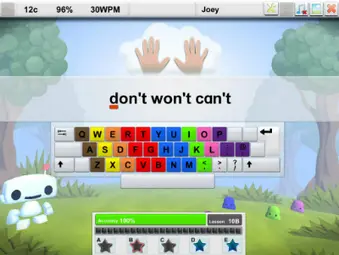
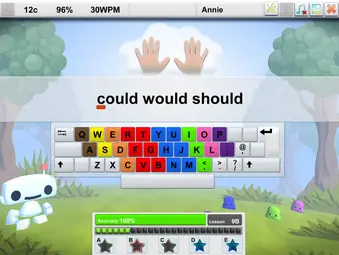
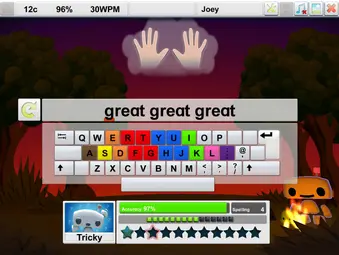
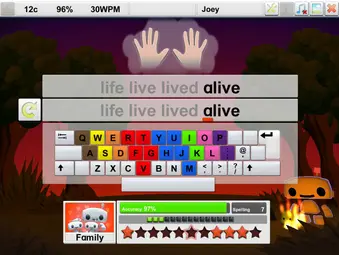
Englishtype uses colour coding to teach finger positions and boost typing speed. It helps children learn key and finger links fast. The design builds strong muscle memory and makes typing feel natural.
Want to know more? Visit our Learning to Type page.
Boost Literacy and Typing Skills By Learning to Touch Type
Englishtype helps children improve both literacy and typing skills at the same time. It uses simple, familiar words that build reading and spelling confidence while teaching correct finger use.
The program is great for all children. It challenges fast learners and gives extra support to those who need more help, including SEN pupils. Every child can learn together but still move at their own speed.
Special Needs friendly features including:
- Multi-sensory activities using sound, colour and movement.
- Bright colour coding that helps with memory.
- Clear, uncluttered screens to make reading easier.
- Both spoken and written instructions.
- A choice of screen colours for visual comfort.
- Step-by-step lessons that build confidence.


Touch Typing Program Activities
Englishtype Junior teaches children to touch type using a range of simple and fun activities. Each activity is designed to keep them motivated and help them learn step by step:
-
Lessons – Main Lessons, Extra Practice and Numbers & Symbols.
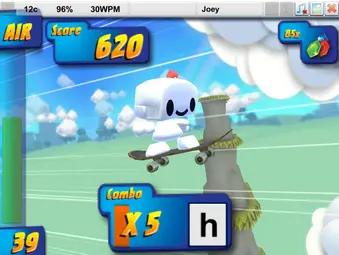
Typing Games – fun games that help children learn without an onscreen keyboard
-
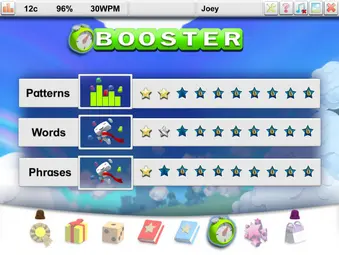
Booster – short exercises that build muscle memory and increase speed.
-
Type Tests & Certificates – earn Bronze, Silver or Gold certificates.
-
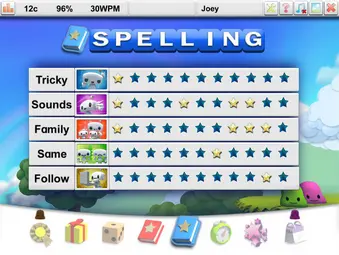
Spelling – see, hear, read and type each word.
-
Awards – collect trophies, rosettes and stars for progress.
-
Outfits – unlock new costumes to change Qwerty’s look.
-
Diary – record practice days and collect new stickers


Different activities keep learning fun
Lessons
The typing lessons form the core of the program, helping children learn which fingers are linked to which colours and letters, while teaching proper finger placement. Each lesson is divided into 3 main sections:
-
A focuses on finger movements
-
B covers words
-
C works with phrases
There are also extra D and E sections for additional typing practice for kids, making 5 sections in total per lesson. Bronze, silver, and gold stars keep learners motivated as they progress.
At the end of every lesson, key accuracy is displayed, highlighting any letters that need extra attention. This structured approach helps build muscle memory and confidence with the keyboard.


Games
There are 6 typing games. After each Lesson level, a game unlocks – games are fun but test if you’ve learned the letters – there is no onscreen keyboard to help. Lessons and early games focus on accuracy only; it’s important to be accurate or you will never be quick. Later games need accuracy and speed.


Booster
Booster starts about halfway through the program. It’s a fun activity that helps you build muscle memory fast. They’ll repeat common pairs of letters and short words to improve their typing speed and accuracy. By learning simple patterns instead of single letters, your typing becomes quicker and more natural.


Spelling
There are also optional Spelling lessons for anyone who finds spelling tricky or wants extra practice. There are 5 different activities – all focus on relevant, high frequency words. The words are spoken, then disappear from the screen. Click to read & listen again if needed.


TypeTest & Certificates
Finally, you’ll take two quick tests to check your progress. One halfway through and one after Lesson 12. Getting a Gold medal in TypeTest 2 shows your muscle memory is working. You can view and print your colourful certificate to mark your success.


Schools and Teachers
Englishtype Junior is simple to use in any school. It fits easily into lessons or clubs, before or after school. Teachers can also use it for extra help with SEN pupils.
Combining class time with practice at home helps children learn faster. Schools can offer discounted home copies so pupils can keep improving.
For teachers, Englishtype Junior includes tools to manage classes, print results, and create certificates.
Visit our Schools/Teachers page to learn more.


If practice is done quite intensively (3 months) then about 20-25 hours of practice will get most children typing by touch. 10-15 minutes, twice daily (morning and afternoon / evening) will get good results in 12 weeks. The school summer holiday is ideal for an intensive course, 30-45 mins twice daily will get most kids touchtyping in 4-6 weeks, going back to school in September with a very impressive new skill – especially if no one else can do it!
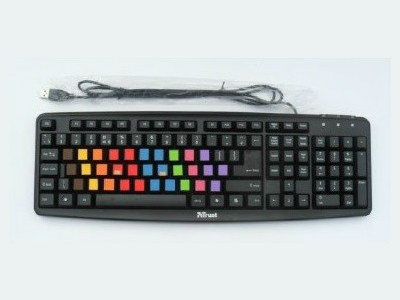
To learn to type by touch and get the skill into the muscle memory and out of the conscious brain, it’s essential NOT to see the letters while learning. Traditionally, touch typing was taught with the hands & keyboard covered and you can still use this technique. But our results have shown significant improvement when you make a real coloured keyboard to match the onscreen colours in Englishtype. See the “Learning to Type” page for more details.
Both Junior & Senior teach touch typing in the same way. The main difference is the vocabulary in the higher settings of each program – there are simple, easy settings and more difficult words for more of a challenge. We recommend Junior for up to age 11 yrs (Primary school) and Senior after that. Some 12 year olds (or older) may prefer the fun in Junior, it’s personal preference.
Englishtype’s online typing course works on most computers. It runs on Microsoft Windows 7 or higher and on MacOS Catalina 10.15 or above. It does not usually run on iPads or Android devices.
We recommend using Edge, Chrome or Safari. Make sure your browser is updated to the latest version. Your child can log in from any compatible device.
For Mac users:
If Safari is not working and your Mac is not on the latest OS, try updating Safari through the App Store. If that doesn’t help, download Chrome instead. You can use Chrome and Safari at the same time.
If you have concerns about internet access, or prefer your child to work offline, we also offer versions that install directly on your computer. These run offline after the initial setup. Contact us for details.